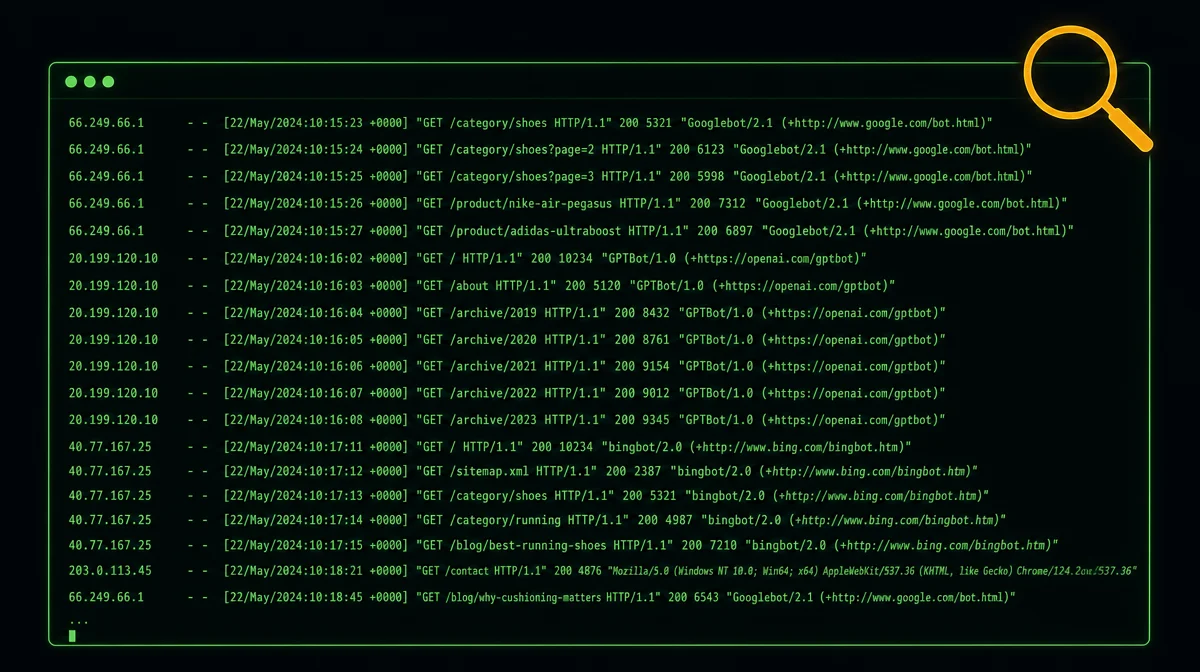
Read your server logs in 30 minutes — find the pages Googlebot ignores
Googlebot may be crawling your worst pages weekly while ignoring your best ones — and GA4 can't show you this. Open your Nginx or Apache access log, run one grep command, and use the free GoAccess tool to build a visual crawl map in 30 minutes. Includes five targeted diagnostic commands and a fix table.
Somewhere on your server right now, a log file is recording every single request Googlebot makes to your site. Not the sampled snapshot in Google Search Console. Not the JavaScript-filtered slice in GA4. Every request — URL, response code, timestamp, and how long your server took to answer.
Most indie developers have never opened that file for SEO purposes. That gap costs them rankings.
A May 2026 case study on r/TechSEO (31 upvotes) put the problem in plain terms: on a 400-page e-commerce site, Googlebot was hitting paginated archive pages and near-duplicate tag pages multiple times a week. The 12 category pages driving 80% of revenue? Crawled roughly once every three weeks. 1 The developer fixed the internal link structure based on what the logs revealed, and within three months 8 of those 12 categories moved from page 2 to page 1.
正在加载内容卡片…
Google's Gary Illyes, a Search Advocate, makes the mechanism explicit in the official "Inside Googlebot" post (March 31, 2026): "If your server is struggling to serve bytes, our crawlers will automatically back off to avoid overloading your infrastructure, which will drop your crawl frequency." 2 Slow responses don't just annoy visitors; they train Googlebot to visit less often.
The whole diagnostic takes 30 minutes with free tools. Here's the procedure.
Before you start: where are your logs?
SSH into your server. Access logs live at:
- Nginx:
/var/log/nginx/access.log - Apache:
/var/log/apache2/access.log - Caddy:
/var/log/caddy/access.log
If you're on Cloudflare's free or Pro plan, raw log access (Logpush) is only available on Enterprise plans starting around $200/month — not viable for indie developers. Skip the Cloudflare dashboard entirely and SSH to your origin server instead. Your Nginx or Apache logs record the real HTTP requests before Cloudflare's edge sees them.
One quick note on scale: you don't need a large site for this to matter. A 50-page portfolio or SaaS site has a smaller crawl budget than a 500-page site — which means each wasted crawl on a low-value URL is a proportionally bigger problem.
Minutes 0–10: extract Googlebot hits and spot the top URLs
Pull every Googlebot request from the last 30 days (adjust the log path and grep pattern to match your setup):
grep -i "Googlebot" /var/log/nginx/access.log > googlebot-hits.logNow rank the URLs Googlebot visits most often:
awk '{print $7}' googlebot-hits.log | sort | uniq -c | sort -rn | head -30Look at the top 30. If the list is dominated by
?sort=, ?filter=, ?session=, pagination paths like /page/2/, or tag archives — that's crawl budget leaking away from the pages you actually want ranked.Minutes 10–20: install GoAccess for a visual dashboard
GoAccess is a free, open-source log analyzer written in C. It generates a self-contained HTML report from your raw log file in seconds, with no data leaving your server. 3
Install on Ubuntu/Debian:
sudo apt install goaccessGenerate the HTML report:
goaccess /var/log/nginx/access.log --log-format=COMBINED -o report.htmlOpen
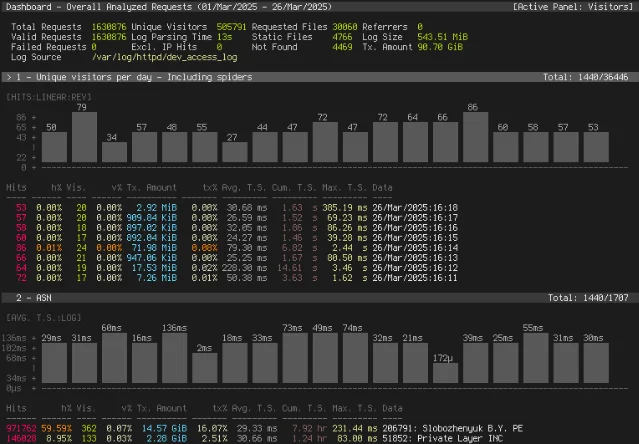
report.html in your browser. You'll see a dashboard showing crawler breakdown by user agent, response codes, 404 errors, top-requested URLs, response times, and bandwidth — all in one page.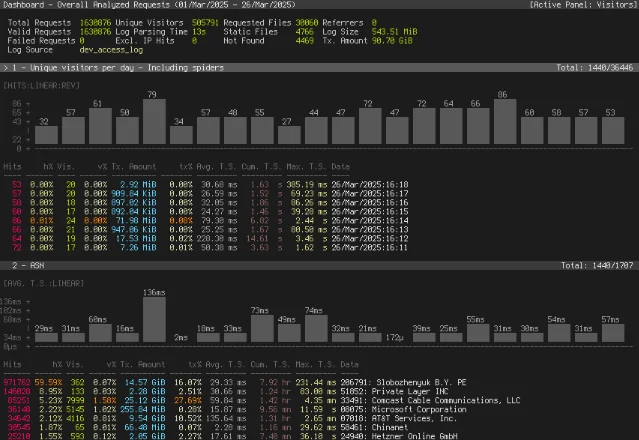
The HTML report version looks like this:
Minutes 20–25: scan for five red flags
Kaspar Szymanski, a former Google Search Quality team member and current Search Engine Land contributor, identifies the most common crawl-waste sources: infinite URL combinations, session parameters, crawlable internal search pages, open faceted navigation, duplicate mobile URLs, exposed staging environments, and broken canonical structures. 4
Run each of these commands against your Googlebot log to check the five biggest problems:
1. 404 spikes — broken pages Googlebot is still trying to reach:
grep " 404 " googlebot-hits.log | awk '{print $7}' | sort | uniq -c | sort -rn | head -202. Slow responses — if your log format includes response time (the
$request_time field in Nginx):grep -i "Googlebot" /var/log/nginx/access.log | awk '{print $NF, $7}' | sort -rn | head -20Pages taking over 2 seconds are candidates for Googlebot to back off from.
3. Crawl-waste URLs — query strings consuming budget:
grep "?" googlebot-hits.log | awk '{print $7}' | sort | uniq -c | sort -rn | head -204. AI crawler volume — traffic consuming server bandwidth without any SEO return:
grep -iE "GPTBot|ClaudeBot|anthropic|PerplexityBot|CCBot" /var/log/nginx/access.log | wc -l5. Orphan pages — pages Googlebot visits that aren't in your sitemap:
Compare the GoAccess URL list against your sitemap XML manually, or pipe to a diff command. Any URL in the logs but absent from your sitemap is either an orphan (no internal links, Googlebot found it via an old link elsewhere) or a URL you forgot to add.
Minutes 25–30: verify Googlebot is real, then take one action
Martin Splitt (Google Search Advocate) flags a non-obvious problem: "Not everyone who claims to be Googlebot actually is Googlebot." 5 Many scrapers spoof the Googlebot user-agent string. Before acting on what you find in the logs, confirm a sample of those IPs is genuine.
Grab a few IPs from your Googlebot hits:
grep -i "Googlebot" /var/log/nginx/access.log | awk '{print $1}' | sort -u | head -5For each IP, run a reverse DNS lookup:
host <IP>The result should end in
.googlebot.com or .google.com. An IP that resolves to anything else — or doesn't resolve at all — is not real Googlebot. Google also publishes its official crawler IP ranges at https://developers.google.com/crawling/ipranges/googlebot.json (updated March 31, 2026 when Google moved these files to the new /crawling/ path). 2Once you've confirmed real Googlebot and identified your biggest problem, pick one action from this table:
| What you found | One-line fix |
|---|---|
| Query-string URLs in top crawled (`?sort=`, `?filter=`) | Add Disallow: /*?sort= to robots.txt |
| Internal search pages crawled (`?s=`, `?q=`) | Add Disallow: /?s= to robots.txt |
| High AI-crawler volume, no SEO benefit | Add User-agent: GPTBot / Disallow: / to robots.txt (repeat for ClaudeBot, anthropic-ai, PerplexityBot) |
| Revenue pages crawled infrequently vs. low-value pages | Add 3+ in-content internal links from your highest-traffic pages to those neglected pages |
| 404 cluster pointing to a deleted URL | Set up a 301 redirect from the dead URL to the most relevant live page |
Why this goes deeper than last week's GA4 audit
Last week's tip was about GA4 analytics distortion — bots inflating session counts and skewing engagement metrics on the client side. Server logs work at a different layer entirely.
GA4 requires JavaScript execution to record a visit. Bots don't run JavaScript. So GA4 never sees most crawler activity at all. Server logs capture the raw HTTP request the instant it hits your infrastructure — every single one, from real users, real Googlebot, fake Googlebots, AI scrapers, and everything else. 4
"Unlike Google Search Console, analytics platforms, and third-party crawlers, server logs capture every request search engines make to your infrastructure." — Kaspar Szymanski 4
GSC tells you which queries drove impressions. GA4 tells you (approximately) which pages humans visited. Server logs tell you which pages Googlebot actually crawled, how often, and how fast your server answered. All three data sources answer different questions.
Your action for this week
Run the Googlebot extraction command against your access log today. It takes under a minute. If your top-crawled URLs are not your most-important pages, you have a crawl budget problem the rest of your SEO work is quietly fighting against.
The log file has been there the whole time.
参考来源
- 1r/TechSEO: Crawl log analysis revealed Google was wasting budget on low-value pages
- 2Google Search Central: Inside Googlebot — demystifying crawling, fetching, and the bytes we process
- 3GoAccess: Visual Web Log Analyzer
- 4Search Engine Land: What server logs reveal that SEO tools miss
- 5Search Engine Land: Googlebot fraud — how to identify and block fake Googlebot traffic
围绕这条内容继续补充观点或上下文。